Accessing USGS data
This notebook does the following:
Load a single USGS point
Look at the metadata
Get multiple radiation datasets
Calculate albedo from the datasets
Plot the albedo evolution
[1]:
# imports
from datetime import datetime
import pandas as pd
import numpy as np

from metloom.pointdata import USGSPointData

# For rendering in readthedocs
import plotly.offline as py
py.init_notebook_mode(connected=True)
[2]:
# Define a point known to have solar measurements
pt = USGSPointData("395709105582701", "Blue Ridge Meteorological Station NR Fraser")

# start data and end date
start_date = datetime(2024, 1, 1)
end_date = datetime(2024, 7, 1)
# Define a list of variables we want
incoming_sw = pt.ALLOWED_VARIABLES.DOWNSHORTWAVE
outgoing_sw = pt.ALLOWED_VARIABLES.UPSHORTWAVE
depth = pt.ALLOWED_VARIABLES.SNOWDEPTH
variables = [incoming_sw, outgoing_sw, depth]
[3]:
# LETS GET THAT DATA
df = pt.get_hourly_data(start_date, end_date, variables)
df.head(10)
/home/docs/checkouts/readthedocs.org/user_builds/metloom/envs/stable/lib/python3.10/site-packages/metloom/pointdata/usgs.py:216: FutureWarning:

In a future version of pandas, parsing datetimes with mixed time zones will raise an error unless `utc=True`. Please specify `utc=True` to opt in to the new behaviour and silence this warning. To create a `Series` with mixed offsets and `object` dtype, please use `apply` and `datetime.datetime.strptime`

/home/docs/checkouts/readthedocs.org/user_builds/metloom/envs/stable/lib/python3.10/site-packages/metloom/pointdata/usgs.py:216: FutureWarning:

In a future version of pandas, parsing datetimes with mixed time zones will raise an error unless `utc=True`. Please specify `utc=True` to opt in to the new behaviour and silence this warning. To create a `Series` with mixed offsets and `object` dtype, please use `apply` and `datetime.datetime.strptime`

/home/docs/checkouts/readthedocs.org/user_builds/metloom/envs/stable/lib/python3.10/site-packages/metloom/pointdata/usgs.py:216: FutureWarning:

In a future version of pandas, parsing datetimes with mixed time zones will raise an error unless `utc=True`. Please specify `utc=True` to opt in to the new behaviour and silence this warning. To create a `Series` with mixed offsets and `object` dtype, please use `apply` and `datetime.datetime.strptime`
[3]:
| geometry | DOWNWARD SHORTWAVE RADIATION | DOWNWARD SHORTWAVE RADIATION_units | UPWARD SHORTWAVE RADIATION | UPWARD SHORTWAVE RADIATION_units | SNOWDEPTH | SNOWDEPTH_units | datasource | ||
|---|---|---|---|---|---|---|---|---|---|
| datetime | site | ||||||||
| 2024-01-01 07:00:00+00:00 | 395709105582701 | POINT Z (-105.97408 39.95258 10657) | -5.64 | W/m2 | -0.021 | W/m2 | 0.616 | m | USGS |
| 2024-01-01 08:00:00+00:00 | 395709105582701 | POINT Z (-105.97408 39.95258 10657) | -9.91 | W/m2 | -0.040 | W/m2 | 0.620 | m | USGS |
| 2024-01-01 09:00:00+00:00 | 395709105582701 | POINT Z (-105.97408 39.95258 10657) | -10.80 | W/m2 | -0.039 | W/m2 | 0.618 | m | USGS |
| 2024-01-01 10:00:00+00:00 | 395709105582701 | POINT Z (-105.97408 39.95258 10657) | -10.30 | W/m2 | -0.041 | W/m2 | 0.619 | m | USGS |
| 2024-01-01 11:00:00+00:00 | 395709105582701 | POINT Z (-105.97408 39.95258 10657) | -9.89 | W/m2 | -0.041 | W/m2 | 0.620 | m | USGS |
| 2024-01-01 12:00:00+00:00 | 395709105582701 | POINT Z (-105.97408 39.95258 10657) | -10.00 | W/m2 | -0.041 | W/m2 | 0.618 | m | USGS |
| 2024-01-01 13:00:00+00:00 | 395709105582701 | POINT Z (-105.97408 39.95258 10657) | -9.92 | W/m2 | -0.042 | W/m2 | 0.619 | m | USGS |
| 2024-01-01 14:00:00+00:00 | 395709105582701 | POINT Z (-105.97408 39.95258 10657) | -9.87 | W/m2 | -0.041 | W/m2 | 0.618 | m | USGS |
| 2024-01-01 15:00:00+00:00 | 395709105582701 | POINT Z (-105.97408 39.95258 10657) | -1.92 | W/m2 | 3.020 | W/m2 | 0.616 | m | USGS |
| 2024-01-01 16:00:00+00:00 | 395709105582701 | POINT Z (-105.97408 39.95258 10657) | 122.00 | W/m2 | 55.000 | W/m2 | 0.614 | m | USGS |
[4]:
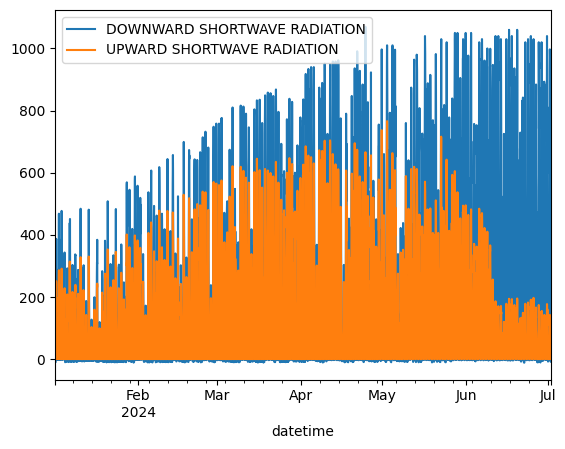
# Check out this data!
df = df.reset_index().set_index("datetime")
var_names = [v.name for v in variables]

# Sample to just the vars
df_rad = df.loc[:, var_names]

df_rad.loc[:, [incoming_sw.name, outgoing_sw.name]].plot()
[4]:
<Axes: xlabel='datetime'>
[5]:
# Let's get the data in a more usable state
sw_thresh = 10

# mask the SW to decent values
df_rad[incoming_sw.name] = df_rad[incoming_sw.name].mask(df_rad[incoming_sw.name] < sw_thresh, np.nan)
df_rad[outgoing_sw.name] = df_rad[outgoing_sw.name].mask(df_rad[outgoing_sw.name] < sw_thresh, np.nan)

# Resample to daily, based on mean values
df_rad = df_rad.resample("D").mean()

# Plot again
df_rad.loc[:, [incoming_sw.name, outgoing_sw.name]].plot()
[5]:
<Axes: xlabel='datetime'>
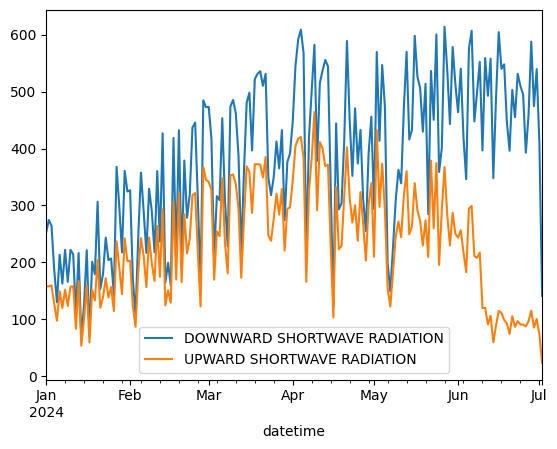
Now we can think Albedo
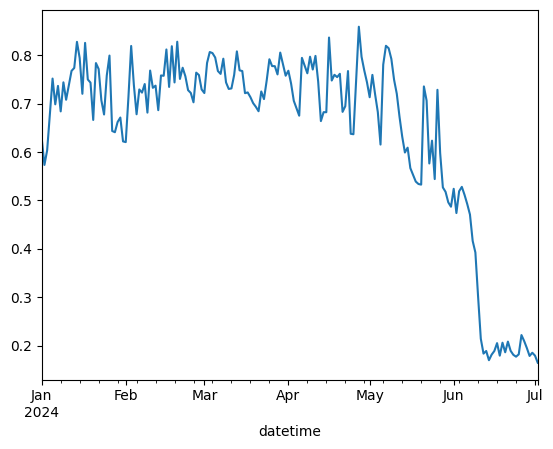
The daily data plot looks much better. Now we can start to think about albedo. We can use the SW to calcaulate albedo next
[6]:
# Calculate albedo
albedo_var = "ALBEDO"
df_rad[albedo_var] = df_rad[outgoing_sw.name] / df_rad[incoming_sw.name]
df_rad[albedo_var] = df_rad[albedo_var].mask(df_rad[albedo_var] < 0.1, np.nan)
df_rad[albedo_var] = df_rad[albedo_var].mask(df_rad[albedo_var] > 1, np.nan)
df_rad[albedo_var].plot()
[6]:
<Axes: xlabel='datetime'>
Better plotting
Awesome - now we have albedo. We haven’t used snowdepth yet, so let’s create a better plot that shows how the two relate
[7]:
# Get plotly for a nicer plot
# !pip install plotly
import plotly.express as px
import plotly.graph_objects as go
from plotly.subplots import make_subplots
[8]:
# Create figure with secondary y-axis
fig = make_subplots(specs=[[{"secondary_y": True}]])

# Add traces
fig.add_trace(
    go.Scatter(x=df_rad.index, y=df_rad[albedo_var], name=albedo_var),
    secondary_y=False,
)

fig.add_trace(
    go.Scatter(
        x=df_rad.index, y=df_rad[depth.name].diff(), name=f"{depth.name} signal", mode="lines+markers"
    ), secondary_y=True,
)

fig.add_trace(
    go.Scatter(
        x=df_rad.index, y=df_rad[depth.name], name=f"{depth.name}", opacity=0.3,
    ), secondary_y=True,
)

fig.update_layout(
    # template='plotly_dark',
    title=f'{pt.name}',
    xaxis=dict(title='Date'),
    yaxis=dict(
        title=f'Unitless',
        titlefont=dict(color='blue'),
        tickfont=dict(color='blue'),
        tickvals=[.25, .5, .75, 1.0],
        range=[.25, 1]
    ),
    yaxis2=dict(
        title=f'[m]',
        titlefont=dict(color='red'),
        tickfont=dict(color='red'), overlaying='y', side='right'
    )
)

# Show the plot
fig.show()
Summary
We started with a point that we knew had shortwave measurements.
Next, we pulled all the necessary data, cleaned it, and resampled to daily.
We calculated albedo, and plotted it to see how the snow
[ ]: